vibe-monitor
Vibe Monitor



Real-time status monitor for AI coding assistants with pixel art character display.
See at a glance what your AI coding assistant is doing — thinking, writing code, or waiting for input. A cute pixel art character visually represents the current state.
Supported Tools
| Tool | Description |
|---|---|
| Claude Code | Anthropic’s official AI coding assistant |
| Kiro | AWS’s AI coding assistant |
What It Monitors
| Field | Description | Example |
|---|---|---|
| State | Current activity state | working, idle, notification |
| Project | Active project directory | vibe-monitor |
| Tool | Currently executing tool | Bash, Read, Edit |
| Model | Active model | Opus 4.5, Sonnet |
| Memory | Context window usage | 45% |
Platforms
| Platform | Description | Best For |
|---|---|---|
| Desktop App | Electron app with system tray | Daily use, always-visible monitoring |
| Web Simulator | Browser-based preview | Testing, no installation |
| ESP32 Hardware | Dedicated LCD display (experimental) | Hardware enthusiasts |
Preview
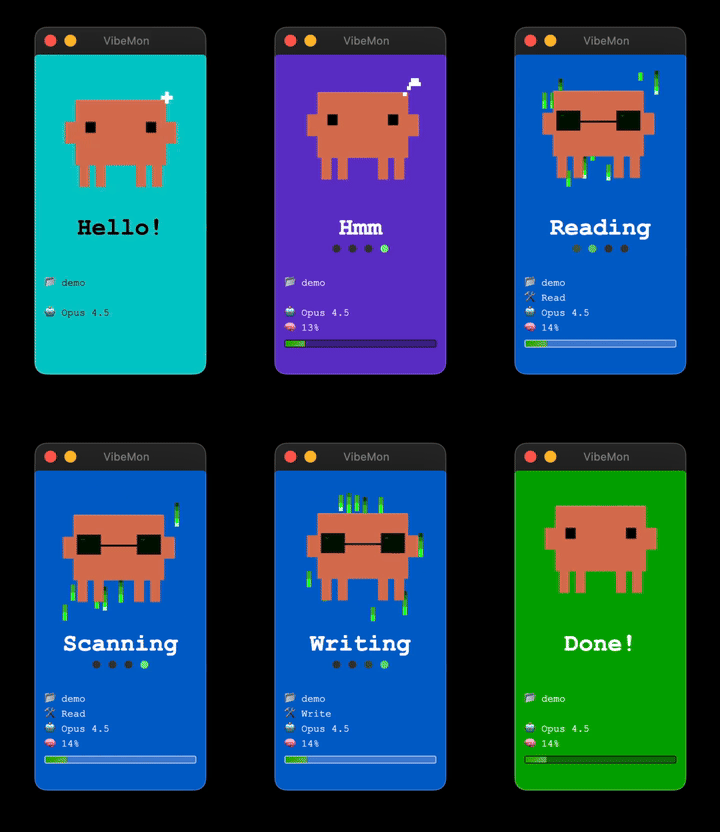
Prerequisites
| Tool | Required For | Install |
|---|---|---|
| Python 3 | Hook scripts | Built-in on macOS/Linux |
| Node.js | Desktop App | brew install node / apt install nodejs npm |
Quick Start
Desktop App
npx vibe-monitor@latest
Or install globally:
npm install -g vibe-monitor
vibe-monitor
Web Simulator
No installation required:
Online: https://nalbam.github.io/vibe-monitor/simulator/
Local:
open simulator/index.html
Integration
Quick Install (Recommended)
curl -fsSL https://nalbam.github.io/vibe-monitor/install.py | python3
The script configures hooks for Claude Code or Kiro automatically.
Manual Setup
See Integration Guide for detailed manual setup instructions.
States
| State | Color | Description |
|---|---|---|
start |
Cyan | Session begins |
idle |
Green | Waiting for input |
thinking |
Purple | Processing prompt |
planning |
Teal | Plan mode active |
working |
Blue | Tool executing |
notification |
Yellow | User input needed |
done |
Green | Task completed |
sleep |
Navy | 5min inactivity |
See Features for animations, working state text, and more.
Characters
| Character | Color | Auto-selected for |
|---|---|---|
clawd |
Orange | Claude Code |
kiro |
White | Kiro |
HTTP API
Default port: 19280
POST /status
Update monitor status:
curl -X POST http://127.0.0.1:19280/status \
  -H "Content-Type: application/json" \
  -d '{"state":"working","tool":"Bash","project":"my-project"}'
GET /status
Get all windows’ status:
curl http://127.0.0.1:19280/status
POST /quit
Stop the application:
curl -X POST http://127.0.0.1:19280/quit
See API Reference for all endpoints.
Window Mode
| Mode | Description |
|---|---|
multi |
One window per project (max 5) - Default |
single |
One window with project lock support |
Switch via system tray menu or API:
curl -X POST http://127.0.0.1:19280/window-mode \
  -H "Content-Type: application/json" \
  -d '{"mode":"single"}'
Project Lock
Lock the monitor to a specific project (single-window mode only):
# Lock
python3 ~/.claude/hooks/vibe-monitor.py --lock

# Unlock
python3 ~/.claude/hooks/vibe-monitor.py --unlock
See Features for lock modes and CLI commands.
Desktop App Features
- Frameless window - Clean floating design
- Always on Top - Stays visible above other windows
- System Tray - Quick access from menubar
- Multi-window - One window per project (up to 5)
- Snap to corner - Auto-snaps near screen edges
- Click to focus - Switch to iTerm2/Ghostty tab (macOS)
ESP32 (Experimental)
See ESP32 Setup for hardware setup instructions.
Troubleshooting
| Issue | Solution |
|---|---|
| Window not appearing | Check system tray, or run curl -X POST http://127.0.0.1:19280/show |
| Port already in use | Check with lsof -i :19280 |
| Hook not working | Verify Python 3: python3 --version |
Documentation
- Integration Guide - Claude Code & Kiro setup
- Features - States, animations, window modes
- API Reference - All HTTP endpoints
- ESP32 Setup - Hardware setup
Version History
- v1.3: Multi-window mode, window mode API, enhanced lock modes
- v1.2: Project lock, modular architecture, npx support
- v1.1: Desktop app, system tray, memory bar gradient
- v1.0: Pixel art character, web simulator
License
MIT